Your text
Import from YouTube
Paste a link to a video with Korean captions. The captions become your text and the video plays along as you type.
Your Korean text
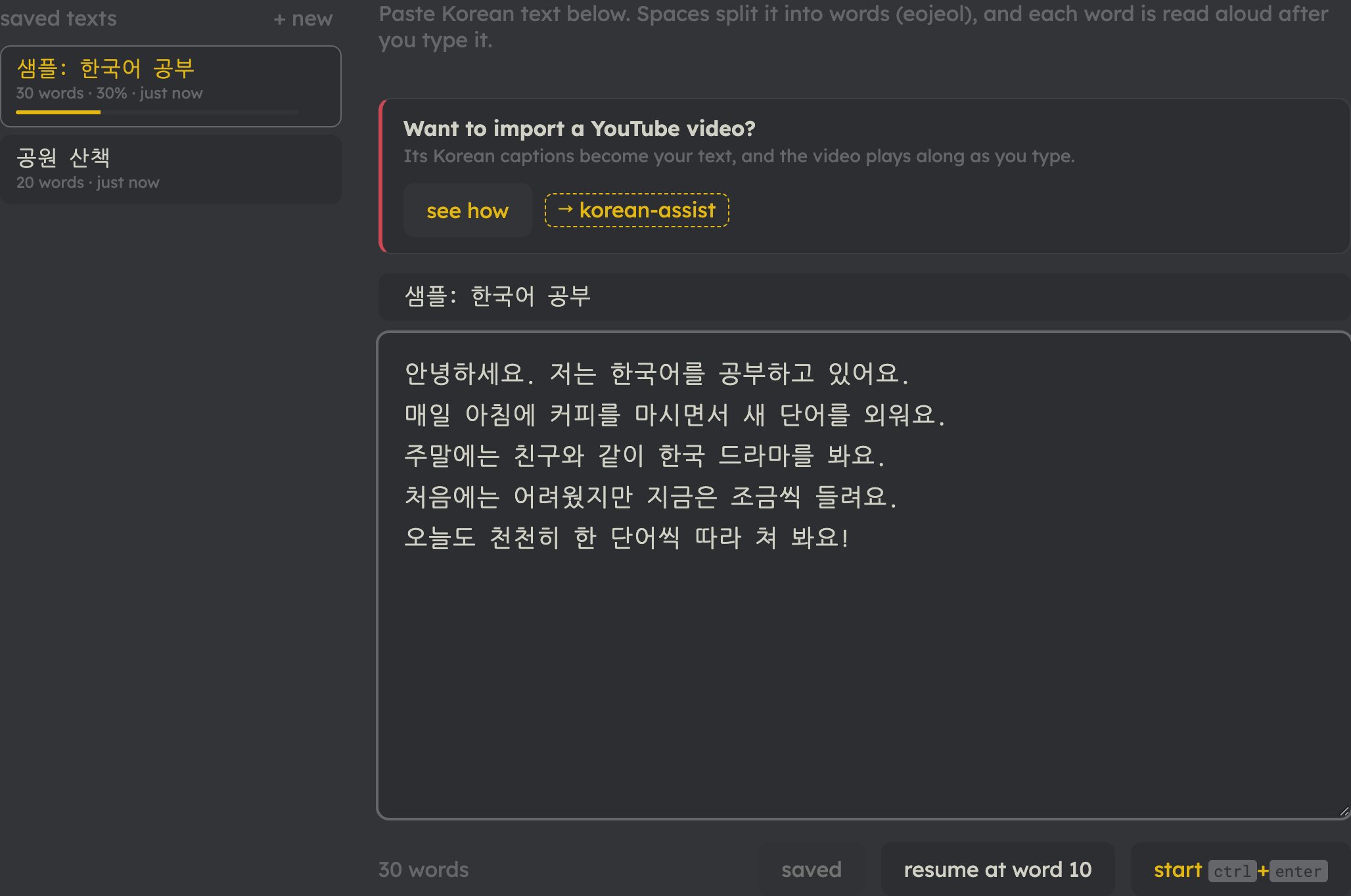
Paste Korean text below. Spaces split it into words (eojeol), and each word is read aloud after you type it.
Typing
Results
paths
Videos with real Korean captions, in order from easier to harder. Pick a path, type your way through it, and earn its badge.
Beginner TOPIK 1–2
First listens
Slow, clear Korean a few minutes at a time. Nothing to prepare: type what you hear, and look up what you don't know.
- At the convenience store Daily Korean with Jaerim
- Just listen on repeat Korean with Mina
- Coffee, slowly Korean with Mina
- At the movie theater Ria Korea 리아 코리아
- For absolute beginners Ria Korea 리아 코리아
- Hobbies Korean with Mina
Double batchim
겹받침 — 닭, 없다, 앉다, 읽다, 삶: a second consonant hiding under the first. Short texts that use them again and again, so your eyes and fingers learn each pair.
- ㄺ: 읽다, 닭, 흙, 맑다, 밝다
- ㄶ, ㅀ: 많다, 않다, 괜찮다, 싫다, 끓다
- ㄵ, ㅄ: 앉다, 얹다, 없다, 값
- ㄻ, ㄼ: 삶, 젊다, 넓다, 밟다, 여덟, 짧다
- ㄳ, ㄽ, ㄾ, ㄿ: 몫, 핥다, 훑다, 읊다
- All of them: a Sunday
Compound vowels
ㅘ ㅝ ㅚ ㅟ ㅙ ㅞ ㅢ — 와, 뭐, 회사, 귀, 왜, 의자: two vowel keys for one sound. Short texts full of them, so the second key comes without thinking.
- ㅘ: 와, 과, 봐요, 화요일, 왔어요
- ㅝ: 뭐, 원, 월요일, 더워요, 고마워요
- ㅚ, ㅟ: 회사, 외국, 되다, 뒤, 위, 쉬다, 귀
- ㅙ, ㅞ: 왜, 돼요, 괜찮아요, 꽤, 웨이터, 웬일
- ㅢ: 의사, 의자, 회의, 희망, 거의, 나의
- All of them: a Monday
Everyday conversations
Questions and answers, a train ride, a daily routine: the sentences you'll actually say, at a gentle pace.
6 videos · premium
Intermediate TOPIK 3–4
Folk tales (전래동화)
Stories every Korean grew up with, read aloud at a storyteller's pace. Narrative tense, dialogue, and a lot of 옛날 옛적에.
6 videos · premium
Out and about
Markets, streets, bookstores, the Han River: vlogs made to be understood, with the words of the places you'll go.
6 videos · premium
Advanced TOPIK 5–6
Real conversations (수다 타임)
Two teachers chatting at full speed about travel, friends, sleep and getting older. Natural Korean, nothing slowed down.
6 videos · premium
Interviews and culture
Kimchi season, a Hungarian student's Korean, the foreigner who made the first Hangul textbook: long-form listening on real subjects.
6 videos · premium
Long listens
Hour-long podcasts to settle into: a cat, a rainy day, a trip abroad, and finally The Little Prince read in Korean.
6 videos · premium
How korean-assist works
korean-assist turns Korean you actually want to read into typing practice. Every word you type is one you read, spell, hear and (if you like) look up, so you learn vocabulary in context while building real Korean keyboard skills.
-
1Bring your own Korean
Paste anything: a textbook dialogue, a news article, song lyrics you’re learning, your own diary. Or import a YouTube video’s captions (see “Want to import a YouTube video?”). Save texts to your library and pick up where you left off.
-
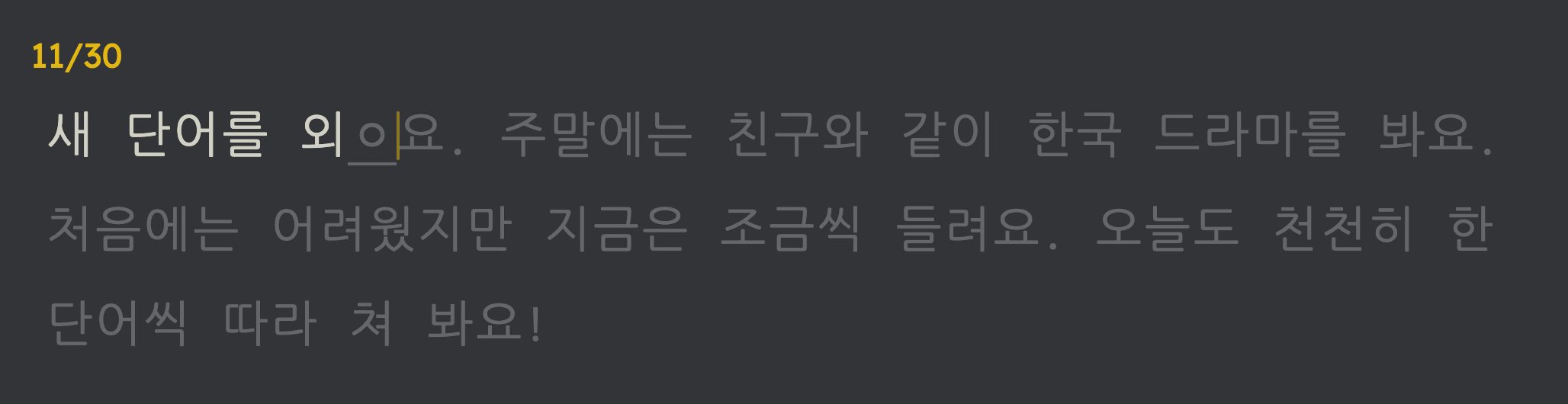
2Type it, word by word
Finished words turn white, mistakes turn red, and a syllable you’re still building shows the jamo typed so far, underlined (ㅎ → 하 → 한). Press space for the next word; backspace on an empty word goes back to fix a mistake.
- You need a Korean keyboard turned on. On a Mac: System Settings → Keyboard → Input Sources → add “2-Set Korean”. On Windows: Settings → Time & language → Language → add Korean.
-
3Hear every word
Each word is read aloud as you finish it, linking how it sounds to how it’s spelled. For texts imported from YouTube, the video itself plays the part you just typed, so you hear the real speaker. You can choose how much plays in settings, and ctrl+s says it again.
-
4Look up any word instantly
Press ctrl+d after a word you don’t know. A banner shows its dictionary form, what it means in this sentence, and how it breaks down into the word and its particles or endings, without interrupting your typing. Meanings are shown in your language.
-
5Ask 선생님 when you’re stuck
선생님 is the Korean tutor behind the round button in the corner of every screen, and already knows what you’re typing: the sentence, the word under the caret and the words you just got wrong, so you can simply ask “why was that wrong?” or “what does this ending do?”. It’s free with an account, up to a daily number of messages, and premium gives you more.
-
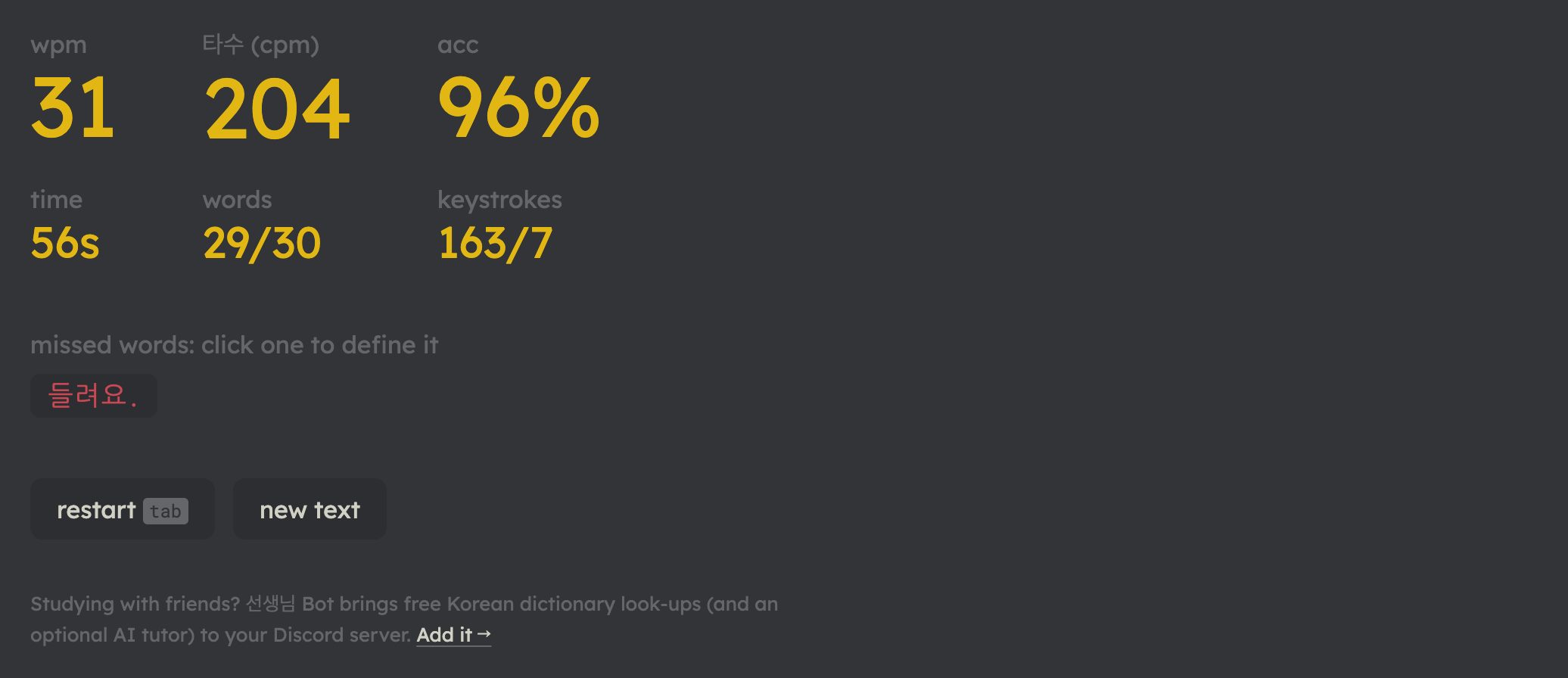
6See your progress
Finish a text to see your speed (wpm and 타수, the usual Korean keystrokes-per-minute), your accuracy, and the words you missed. Click a missed word to look it up. Long texts remember your place, so you can practice a few minutes a day.

Why typing helps you learn
- You can’t skim. Typing makes you notice every syllable, particle and ending you might read past.
- Sound, spelling and meaning together. Seeing, typing and hearing a word at the same moment helps it stick.
- Vocabulary in context. Words come from real sentences you chose, and look-ups explain them as used there.
- A real skill on the side. You build Korean keyboard fluency you’ll use for chatting, searching and writing.
Everything you practice with here is free. Premium gives you more of the extras. see pricing